
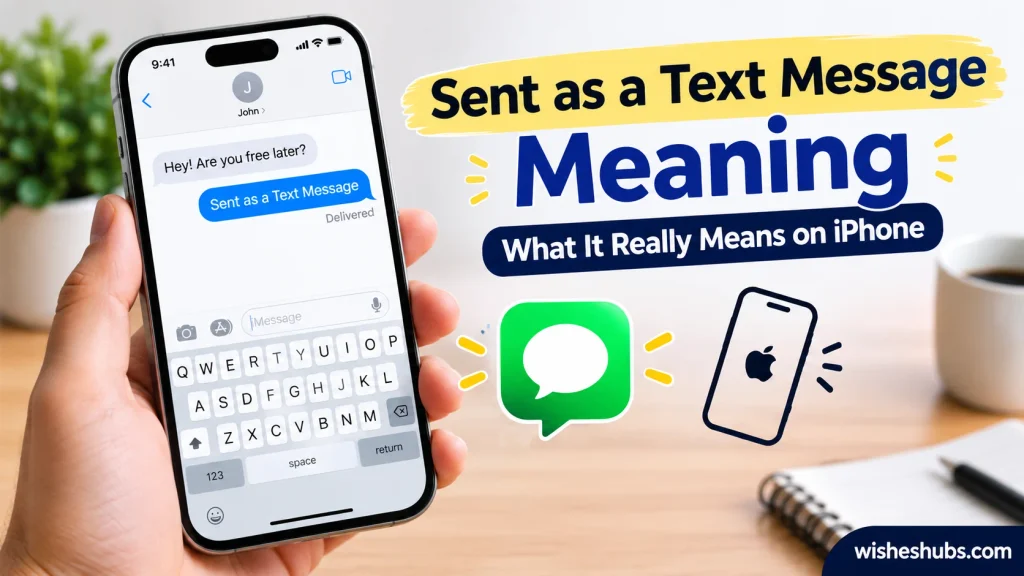
Have you ever seen Sent as a Text Message Meaning on your iPhone and wondered what it really means? This status can appear when your message uses SMS instead of iMessage. Understanding the difference can clear up confusion about delivery, read receipts, green bubbles, and blocking.
When an iPhone displays Sent as a Text Message, it usually means the message traveled through your mobile carrier’s SMS service instead of Apple’s iMessage network. This can happen for several simple reasons, including an unavailable internet connection, an inactive iMessage service, or communication with someone who doesn’t use iMessage. Knowing these basics helps you understand what happened without making unnecessary assumptions.
Many people immediately wonder whether a green message bubble means they have been blocked. However, that conclusion isn’t reliable. A message can switch from iMessage to SMS because of connection problems, device changes, or messaging settings. The status mainly explains the method used to send the message. It doesn’t automatically reveal whether someone received, opened, or ignored your text.
The good news is that understanding this iPhone message status doesn’t require technical knowledge. Once you know how SMS, iMessage, RCS, delivery status, and read receipts differ, the situation becomes much clearer. This guide explains the Sent as a Text Message meaning, common causes, blocking concerns, green bubbles, Wi-Fi requirements, and practical troubleshooting steps using clear and reliable information.
Sent as a Text Message Meaning: Quick Answer
Sent as a Text Message means your iPhone sent the message through your carrier’s SMS text messaging service instead of iMessage. This can happen when iMessage isn’t available, the recipient doesn’t use iMessage, or your iPhone falls back to SMS.
It doesn’t automatically mean you’re blocked. It also doesn’t necessarily mean the person has read the message. The status mainly tells you which messaging method your iPhone used.
Think of it like choosing a different road to reach the same destination. The message still travels to the recipient, but it takes a different route.
What Does Sent as a Text Message Mean?
The Sent as a Text Message meaning is straightforward: your iPhone used a regular cellular text message instead of Apple’s internet-based iMessage system.
Apple uses iMessage for compatible conversations when the service is available. iMessage relies on an internet connection, such as Wi-Fi or cellular data. Traditional SMS uses your mobile carrier’s cellular network.
That’s why you may see a message change from the familiar blue iMessage style to a green message bubble.
For example, imagine you normally text a friend with blue bubbles. One day, the message appears green and your iPhone says Sent as a Text Message. That doesn’t automatically signal a problem between you and your friend.
Their phone might simply be offline. iMessage might temporarily be unavailable. They might have switched phones. Your internet connection could also be causing trouble.
What Is SMS?
SMS stands for Short Message Service. It’s the traditional technology used to send text messages through mobile networks.
SMS doesn’t work the same way as iMessage. It doesn’t depend on Apple’s messaging platform.
Here are the basic differences:
| Feature | SMS Text Message | iMessage |
| Service | Cellular carrier | Apple |
| Internet connection | Usually not required | Required |
| Common iPhone bubble | Green | Blue |
| Apple-only service | No | Yes |
| Typing indicators | Generally unavailable | Available |
| Read receipts | More limited | Available |
| Works with non-Apple phones | Yes | No |
The important point is simple: SMS and iMessage are different messaging systems.
Why Does My iPhone Say Sent as a Text Message?
Several normal situations can cause this status to appear. Your iPhone doesn’t necessarily have a serious problem.
iMessage Isn’t Available
If iMessage can’t connect, your iPhone may use SMS instead when the appropriate settings allow it.
For instance, you might be in an area with poor internet access. Your cellular service could still work even though iMessage can’t connect properly.
In that situation, the phone can use traditional SMS as an alternative.
The Recipient Doesn’t Use iMessage
If you’re texting someone who doesn’t use an Apple device or doesn’t have iMessage available, your conversation may use a different messaging method.
For example, an iPhone sending a traditional text to an Android phone won’t use Apple’s iMessage service.
The message may therefore appear green instead of blue.
Your Internet Connection Is Unavailable
iMessage needs an internet connection. That connection can come from Wi-Fi or cellular data.
If your iPhone can’t access the internet, iMessage may fail. Depending on your settings and circumstances, the phone can then send the message as an SMS.
This explains why a message can sometimes go through even when iMessage doesn’t.
iMessage May Be Temporarily Unavailable
Technical problems can occasionally affect messaging services.
You don’t need to assume something dramatic happened. A temporary connection issue can be enough to change the messaging method.
If your messages return to blue later, the issue may have resolved itself without requiring any action.
Send as Text Message Is Enabled
iPhones include a setting called Send as Text Message. When enabled, the device can send a message as an SMS if iMessage isn’t available.
You can check this under:
Settings → Apps → Messages → Send as Text Message
The exact settings layout can vary slightly depending on your iOS version.
Does Sent as a Text Message Mean the Message Was Delivered?
Not necessarily.
This distinction trips up many people because sent, delivered, and read don’t mean the same thing.
When your iPhone says Sent as a Text Message, it primarily indicates the method used to send the message.
It doesn’t automatically tell you that the recipient has opened it.
| Term | Basic meaning |
| Sent as a text message | Your phone used SMS |
| Delivered | The message reached the recipient’s messaging service or device, where that status is supported |
| Read | The recipient opened or viewed the message when read receipts are available |
Traditional SMS doesn’t provide the same read-status features associated with iMessage.
So if you’re waiting for a response, don’t treat Sent as a Text Message as evidence that the person has read your words.
Does Sent as a Text Message Mean I’m Blocked?
No.
Seeing Sent as a Text Message by itself doesn’t prove that someone blocked your number.
People often search for this meaning because the status appears unexpectedly. The mind naturally fills in the blanks. However, the messaging status doesn’t give you enough information to reach that conclusion.
Other explanations include:
- The recipient’s iPhone is turned off.
- Their internet connection isn’t available.
- iMessage is temporarily unavailable.
- They switched devices.
- Their iMessage settings changed.
- You’re communicating with a non-Apple device.
- Your own internet connection isn’t working properly.
- SMS fallback is being used.
A single messaging indicator isn’t a reliable way to determine whether someone blocked you.
Why People Think It Means Blocking
The confusion usually starts when a conversation suddenly changes from blue to green.
If that happens immediately after someone stops responding, it can feel suspicious. However, timing doesn’t prove cause.
A person could be offline at exactly the same time. Their phone could have a technical problem. They might have changed their device.
Green doesn’t equal blocked.
That’s an important rule to remember.
Sent as a Text Message vs iMessage
The easiest way to understand the difference is to compare what happens behind the scenes.
iMessage is Apple’s messaging service. It uses an internet connection and offers features such as typing indicators, high-quality media sharing, and read receipts when those features are enabled and supported.
SMS, meanwhile, uses the cellular network provided by your carrier.
Neither system automatically tells you anything about the relationship between sender and recipient.
SMS vs iMessage at a Glance
| Category | SMS | iMessage |
| Developed by | Mobile industry/carriers | Apple |
| Connection | Cellular network | Internet |
| iPhone bubble | Green | Blue |
| Android compatibility | Yes | No |
| Read receipts | Limited | Supported |
| Typing indicators | No | Yes |
| Group features | More limited | More advanced |
| Internet required | No | Yes |
The technology behind the message matters more than the bubble color.
Why Did My Message Turn Green?
A green message bubble generally means the message wasn’t sent as an iMessage.
That can happen for several reasons. The recipient may not be using iMessage. Your iPhone may have lost internet access. iMessage may be unavailable. Your device may have sent the message through SMS fallback.
A green bubble therefore isn’t automatically bad news.
Does Green Mean the Person Has an Android Phone?
Often, yes. However, the bubble color itself simply indicates that the message wasn’t sent through iMessage.
Modern iPhones can also use RCS for supported conversations. RCS is different from both traditional SMS and iMessage, although Apple displays non-iMessage conversations differently from blue iMessage conversations.
That’s why the underlying messaging technology matters when interpreting a green bubble.
Also Read This: IDC Meaning in Text: What Does IDC Mean in Texting?
What Happens When iMessage Fails to Send?
When iMessage can’t be used, the iPhone may have another route available.
The basic process looks like this:
You type a message
↓
iPhone attempts to use iMessage
↓
iMessage isn’t available
↓
SMS fallback may be used
↓
Message appears as a text message
This process can happen without anything being wrong with your phone permanently.
If Send as Text Message is enabled, your iPhone can use SMS when iMessage isn’t available.
That’s particularly useful when you need a message to reach someone and don’t want to wait for iMessage to become available.
Can You Send a Message as a Text Instead of iMessage?
In some situations, yes.
When an iMessage fails to send, your iPhone may provide an option to send the message as a text message. You can also enable the Send as Text Message setting to allow SMS fallback.
However, availability can depend on your iPhone settings, iOS version, carrier, and the recipient’s messaging setup.
It’s worth remembering that SMS may have different limitations than iMessage. Your carrier’s plan also determines how SMS is handled.
How to Fix Sent as a Text Message on iPhone
If every message suddenly appears as a text when you normally use iMessage, a few basic checks can help.
Check Your Internet Connection
Start with the simplest possibility.
Open a website or another internet-based app. If nothing loads, your iPhone may not have a working internet connection.
Try switching between Wi-Fi and cellular data.
Check iMessage Settings
Go to:
Settings → Apps → Messages
Make sure iMessage is turned on.
If it’s already enabled, checking the setting can still help identify whether something changed.
Check Send as Text Message
Look for Send as Text Message in your Messages settings.
If enabled, your iPhone may automatically fall back to SMS when iMessage isn’t available.
That behavior is intentional rather than necessarily indicating a fault.
Restart Your iPhone
A quick restart can resolve temporary connection or software glitches.
It sounds almost too simple. Yet sometimes the simplest fix wins.
Check the Recipient’s Number
If the problem happens with only one contact, verify that you’re using the correct phone number.
Also consider whether that person recently changed phones or switched from an iPhone to another device.
Update iOS
Keeping iOS updated can help maintain compatibility with Apple’s messaging services and address known software issues.
If the problem continues after basic troubleshooting, Apple Support or your mobile carrier may be able to identify a service-specific issue.
Does Sent as a Text Message Cost Money?
It can, depending on your mobile carrier and plan.
Traditional SMS travels through your carrier’s messaging network. Some plans include unlimited texting while others may have different terms.
Don’t assume that every SMS costs an additional fee. Check the details of your specific cellular plan if you’re concerned about charges.
By comparison, iMessage uses an internet connection. It doesn’t work as a traditional SMS message.
However, using cellular data for iMessage can consume data from your plan.
Does Sent as a Text Message Work Without Wi-Fi?
Yes, traditional SMS can work without Wi-Fi.
That’s one of the biggest differences between SMS and iMessage.
SMS uses your cellular carrier’s network rather than requiring an internet connection. Therefore, you can often send an SMS even when Wi-Fi isn’t available.
You still need appropriate cellular service.
For example, imagine you’re somewhere with no Wi-Fi but have strong cellular coverage. A traditional text can still work.
iMessage, on the other hand, needs an internet connection.
Does Sent as a Text Message Work Without Mobile Data?
Generally, SMS doesn’t require mobile data.
This distinction causes plenty of confusion.
Mobile data lets your phone access the internet through your cellular network. SMS uses a separate cellular messaging system provided by your carrier.
So you can have:
- Wi-Fi turned off
- Mobile data turned off
- Cellular signal available
…and traditional SMS may still work.
However, iMessage needs an internet connection. That can come from Wi-Fi or cellular data.
Sent as a Text Message on iPhone vs Android
Cross-platform messaging creates another common source of confusion.
iMessage is Apple’s proprietary messaging service. Android devices don’t use iMessage.
When an iPhone communicates with an Android phone, the conversation uses a non-iMessage system such as RCS or SMS, depending on device, carrier, settings, and software support.
This is why iPhone users often see green bubbles during conversations with Android users.
What Is RCS?
RCS, or Rich Communication Services, is a newer messaging standard designed to provide richer features than traditional SMS.
Depending on support from the carrier and devices involved, RCS can provide features such as:
- Higher-quality media sharing
- Typing indicators
- Read receipts
- Better group messaging
- Larger message capabilities
RCS and iMessage aren’t the same service. Apple continues to distinguish iMessage conversations from other messaging systems in the Messages app.
Common Misunderstandings About Sent as a Text Message
The phrase sounds technical, yet people often attach personal meanings to it.
Here are the biggest misconceptions worth clearing up.
It Doesn’t Mean the Person Read the Message
Sending and reading are two different events.
A message can leave your phone without the recipient opening it. Traditional SMS also doesn’t provide the same read-receipt system as iMessage.
It Doesn’t Automatically Mean You’re Blocked
A green bubble or SMS status isn’t enough evidence to determine blocking.
Several ordinary technical situations can produce the same result.
It Doesn’t Mean the Recipient Ignored You
If someone hasn’t responded, the messaging status doesn’t explain why.
They might be busy. They could be offline. They may not have noticed the message.
The status only gives technical information about how the message was sent.
It Doesn’t Describe the Message’s Emotional Tone
Sent as a Text Message isn’t slang for something emotional, romantic, sarcastic, or negative.
It describes the messaging method.
It Usually Describes the Delivery Method
This is the key takeaway.
When you see the phrase, think SMS instead of iMessage. Don’t automatically attach a personal story to it.
Sent as a Text Message Meaning in a Conversation
The phrase can have a slightly different meaning when someone uses it in ordinary conversation.
For example:
I sent the details as a text message.
Here, the person simply means they delivered the information through a text rather than another communication method such as email or a messaging app.
Likewise:
It didn’t go through iMessage, so I sent it as a text.
That statement describes a technical choice.
The phrase itself isn’t generally a secret acronym or piece of texting slang.
Examples of Sent as a Text Message
Real situations make the meaning much easier to understand.
Example: iMessage Isn’t Available
You send a message while your internet connection isn’t working. Your iPhone can’t use iMessage and sends the message as SMS instead.
Meaning: The phone used a different messaging route.
Example: You’re Texting an Android User
You have an iPhone and send a message to someone using Android.
Meaning: The conversation doesn’t use Apple’s iMessage service. Depending on available support, the message may use RCS or SMS.
Example: Wi-Fi Isn’t Available
You’re traveling and lose Wi-Fi. Your cellular connection remains active.
Meaning: Traditional SMS may still work even though iMessage cannot operate without internet access.
Example: SMS Fallback Is Enabled
iMessage fails temporarily. Your iPhone has Send as Text Message enabled.
Meaning: The phone can automatically fall back to SMS.
Example: Someone Intentionally Uses SMS
A person may choose traditional texting for practical reasons.
Meaning: They simply selected a different communication method. There’s no hidden emotional message in the wording.
What Should You Do When You See Sent as a Text Message?
In most cases, don’t panic.
If the message appears to have sent successfully and you don’t notice any other issue, you usually don’t need to do anything.
If the behavior keeps happening unexpectedly, check:
- Your Wi-Fi or cellular connection
- iMessage settings
- Send as Text Message settings
- Your recipient’s phone number
- Whether the recipient recently changed devices
- Your iOS version
- Your carrier service
Most importantly, don’t use the status as a relationship detective.
A green bubble can’t tell you whether someone is annoyed. It can’t tell you whether they secretly blocked you. It can’t tell you why they haven’t replied.
Technology gives you a status. It doesn’t give you someone’s thoughts.
Sent as a Text Message Meaning: Quick Facts
| Question | Clear answer |
| What does it mean? | The message was sent using SMS rather than iMessage |
| Does it mean I’m blocked? | No, not by itself |
| Does it mean they read it? | No |
| Does it mean they received it? | The status alone doesn’t establish that they read it |
| Why is the bubble green? | The conversation isn’t using iMessage |
| Does SMS need Wi-Fi? | No |
| Does SMS need mobile data? | Generally no |
| Can iPhone text Android? | Yes |
| Is SMS the same as texting? | SMS is one type of traditional text messaging |
| Can iMessage fall back to SMS? | Yes, when the relevant setting and circumstances allow it |
FAQs:
What does sent as a text message mean on iPhone?
It means your iPhone sent the message using SMS instead of iMessage. This can happen when iMessage isn’t available, your internet connection isn’t working, or the recipient doesn’t use iMessage.
Does sent as a text message mean I am blocked?
No. Sent as a Text Message doesn’t prove that someone blocked your number. Internet problems, iMessage settings, device changes, and other technical issues can cause the same message status.
Does sent as a text message mean they received it?
Not necessarily. The status mainly explains that your message used SMS. It doesn’t automatically confirm that the recipient opened or read the message.
Does sent as a text message mean they read my message?
No. Traditional SMS doesn’t provide the same read-receipt features as iMessage. Someone may receive a text without you getting reliable information about whether they actually read it.
Why did my iMessage turn green?
A green bubble means the message wasn’t sent through iMessage. The recipient may not use iMessage, iMessage may be unavailable, or your iPhone may have switched to SMS because of connection or messaging settings.
Can an iPhone send an iMessage as a text message?
Yes. When iMessage isn’t available, an iPhone can sometimes send the message through SMS if the Send as Text Message setting is enabled. This provides an alternative way to send the message through your cellular carrier.
Can I send a text message without Wi-Fi?
Yes. Traditional SMS doesn’t require Wi-Fi because it uses your mobile carrier’s cellular network. You generally need cellular service, however. iMessage works differently because it requires an internet connection through Wi-Fi or cellular data.
Why does my iPhone keep sending messages as text messages?
Check your internet connection, iMessage settings, and Send as Text Message option. If the issue only affects one contact, their device, phone number, or messaging setup could also explain the problem.
Is SMS the same as a text message?
SMS is a type of traditional text messaging. SMS stands for Short Message Service and uses a cellular carrier’s network. People commonly use the terms SMS and text message interchangeably when discussing ordinary mobile texting.
Does sending a message as SMS cost money?
It depends on your mobile carrier and plan. Many plans include text messaging, while others may have specific limits or charges. Check your current cellular plan for accurate pricing rather than assuming every SMS message costs extra.
Conclusion:
The Sent as a Text Message Meaning is simple: your iPhone used SMS instead of iMessage. This usually reflects a technical messaging change and doesn’t automatically indicate blocking, ignoring, or any personal issue with the recipient.
Understanding SMS, iMessage, green bubbles, delivery status, and read receipts makes this confusing notification much easier to interpret. If your message sends normally, there’s usually no reason to worry. However, repeated issues may require checking your internet connection, messaging settings, device, or carrier service.
Most importantly, don’t treat Sent as a Text Message as evidence that someone blocked or ignored you. The status describes the messaging method, not the recipient’s intentions. Once that distinction is clear, the meaning becomes straightforward and much easier to understand.

Anna Brown is a passionate writer at WishesHubs, sharing heartfelt wishes, quotes, and messages for every special moment.
1 thought on “Sent as a Text Message Meaning: What It Really Means on iPhone”